E-invoice Login: Why Your Food Business Cannot Ignore This Portal
If you run a business in India and your turnover crosses the limit set by the government, you have probably heard about e-invoicing. It is a system where your business invoices get validated by the government before they are considered fully legal. But here is the thing that confuses a lot of people. You do not create the invoice on some government website. You create it in your own billing software, and then you upload the details to a portal for authentication. That portal is called the e-invoice portal, and getting into it starts with something as simple as a login.
What Is This Portal Anyway?
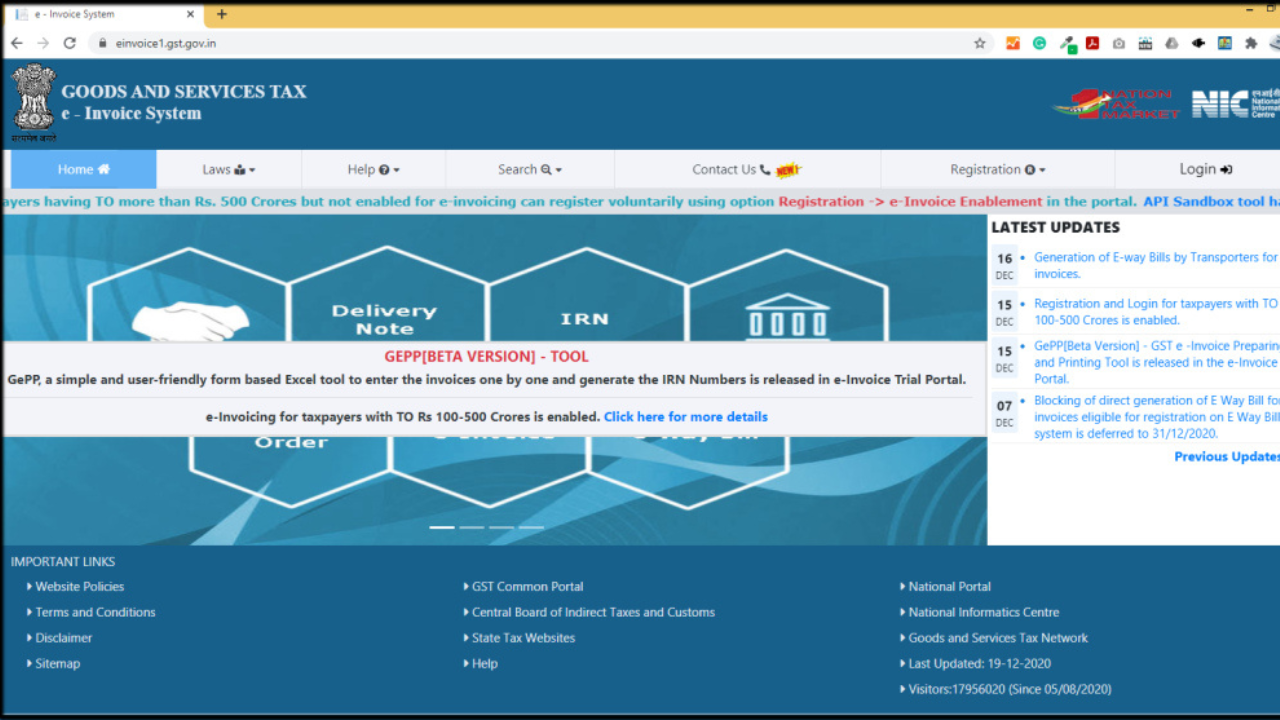
The main website is einvoice1.gst.gov.in. It is run by the National Informatics Centre under the GST system. When people say e-invoice portal, they are talking about the Invoice Registration Portal or IRP. This is where your invoice details go to get checked and stamped with a special number called the Invoice Reference Number, or IRN. Once that IRN is generated, your invoice becomes official in the eyes of the tax department.
There is also a backup site at einvoice2.gst.gov.in. Both work exactly the same way and your login details work on both. If the first one is acting up or under maintenance, just switch to the second one. I have had to do this myself when the main site was crawling at 2 in the afternoon at month-end.
Do You Even Need to Bother?






Not everyone needs this. E-invoicing is only mandatory if your business turnover is 5 crore rupees or more in any financial year starting from 2017-18. And even then, it is only for your business-to-business sales, exports, and anything you sell to government departments. Your business-to-consumer sales do not need an IRN.
But here is something a lot of people miss. Some businesses are completely exempt even if they cross the 5 crore mark. If you are a bank, an insurance company, an NBFC, a goods transport agency, a passenger bus or train service, or an SEZ unit, you do not need to generate e-invoices. So if you fall into any of these categories, you can stop reading right now and go back to your regular billing.
Read Also: 25 Best Hairstyles for Long Hair to Try for Every Occasion
Getting Registered: The One-Time Pain
Before you can log in, you need to register on the portal. This is a one-time thing but you have to do it right. Here is exactly how it goes.
Open einvoice1.gst.gov.in in your browser. Make absolutely sure you are on the real government site because there are fake lookalikes out there. Click on registration. Enter your GSTIN and the captcha. The portal will pull your business name, address, mobile number and email straight from the GST database. If any of these are wrong, do not proceed. Go back to the main GST portal, update your details there, wait for it to sync, and then come back.
Assuming everything looks correct, click Send OTP. You will get two OTPs. One on your registered mobile and one on your registered email. Enter both. Then create your username and password. Write them down somewhere safe because forgetting them is a headache you do not want.
The Actual Login Process
Once registered, logging in is simple. Go to einvoice1.gst.gov.in. Enter your username and password. Fill the captcha. Click login. You are in.
But here is something new from April 2026. Multi-factor authentication is now mandatory on both the IRP and the e-way bill portal. So after your password, the system sends another OTP to your phone or email. You have to enter that too. Keep your phone nearby when you log in. It is an extra step but it stops people from messing with your account.
Also, if you already have an account on the e-way bill portal, you can use the exact same username and password for the e-invoice portal. The government linked these two systems together, so one login covers both. That is genuinely helpful.
What Happens After You Log In?
Once you are inside, the dashboard shows you several options. You can generate a single IRN by filling in one invoice manually. This is fine if you only have a few invoices a day. But if you are dealing with dozens or hundreds, you will want the bulk upload feature. You prepare a JSON file through your accounting software, upload it, and the portal processes all invoices together.
You can also view your past e-invoices. Search by IRN, invoice number, or date range. You can download the PDF version which includes the IRN and a QR code. Your customer might ask for this, so it is good to know where it lives.
Made a mistake on an invoice? You can cancel it but only within 24 hours of generating the IRN. Miss that window and you cannot simply delete it anymore. You have to issue a credit note or debit note through your regular GST return in GSTR-1. So double check everything before you hit submit.
If you are using software like Tally, Zoho Books, or Busy, you can register for API access. This connects your billing software directly to the IRP. Invoices get validated automatically in the background. You do not have to manually log in and upload files every single time. Once set up, it runs on its own.
When the Portal Acts Up
Government websites are not exactly known for their speed. If the einvoice portal is loading like it is stuck in 2005, try a few things. Clear your browser cache. Switch to incognito mode. Try a different browser altogether. Chrome usually works better than others for this particular site.
Forgot your password? Use the forgot password link. It sends an OTP to your registered mobile. Reset and move on. But if your login keeps failing even with the right password, check your GSTIN status. If your PAN and GST records do not match, the portal will lock you out until you fix it on the main GST website. This happens more often than you would think, especially after PAN corrections or business name changes.

Why All This Login Drama Is Worth It
I know it feels like extra work. You are already generating invoices in your software. Why upload them again? Here is why it matters. Without the IRN, your B2B invoice is not considered a valid tax invoice under the current rules. Your buyer cannot claim input tax credit on it. And if the tax department checks, you could face penalties for non compliance.
The other big benefit is that the portal auto populates your invoice data into GSTR-1. You do not have to sit and type out every sale again when filing your monthly return. It reduces errors, catches fake invoices, and makes the whole system cleaner. Once you get used to the workflow, it actually saves time compared to the old manual way.
Final Thoughts
The e-invoice login is not some scary government hurdle. It is just your entry point into a system that validates your business invoices. Register once with your GSTIN, remember your password, and you are set. From there you can upload invoices, download IRN certificates, check your history, and even automate the whole thing through API if you want.
If your turnover crosses the 5 crore mark, do not wait for your auditor to remind you. Just go to einvoice1.gst.gov.in, get yourself registered, and start using it. The first time feels confusing. The second time feels familiar. By the third time, you will wonder why you ever worried about it.
Read More: December Birth Flower: Meaning, Care and Winter Decor Ideas